Masks
You can hide parts of a layer with a mask. Areas painted on the mask show the layer, and empty areas hide it. Paint layers, Object layers, groups, fill layers and filters can have masks.
Adding a mask
Do one of the following:
- Choose Layer > Mask > Add mask.
- Select Add mask at the bottom of the Layers panel.

The mask thumbnail appears to the right of the layer thumbnail, with an outline that marks it as the target for brushes. A new mask shows the whole layer. If a selection is active, the mask shows only the selected area, and the selection is cleared.
If the layer already has a mask, Add mask selects it for painting. You can’t add a mask to a selection layer or a locked layer.
Painting on a mask
Select the mask thumbnail to paint on the mask. To paint on the layer again, select the layer thumbnail or press Escape.
Memo: Brushes ignore the paint color on a mask. They reveal the layer, and the Eraser hides it.
On an inverted mask, brushes and the Eraser swap roles. Mask strokes are dry, with no mixing, bleed or texture.
Mask editing bar
While you paint on a mask, a bar labeled “Editing layer mask” appears at the bottom of the canvas.

- Invert Layer Mask swaps the shown and hidden areas.
- Enable Layer Mask turns the mask on or off.
- Apply Mask erases the pixels the mask hides, then removes the mask.
- More holds the Layer menu and Show canvas action bar. Turn off Show canvas action bar to hide the bar.
- Edit Content returns to painting on the layer.
Masks from selections
You can make a mask from the current selection.
Do one of the following:
- Choose Layer > Mask > Mask: reveal selection or Mask: hide selection. On a layer with a mask, the items read Replace mask: reveal selection and Replace mask: hide selection.
- Choose a mask command from Mask in the selection bar on the canvas. The new mask shows the selected area and replaces any mask the layer had.
A filter or fill layer added while a selection is active gets a mask from the selection. Paste Into creates a new layer masked to the selection (see Copy and paste).
Selections from masks
You can load a mask as a selection.
Do one of the following:
- Choose Select > From Layer Mask and Load Mask as Selection, Add Mask to Selection, Subtract Mask from Selection or Intersect with Mask.
- Choose the same items from Pixel Selection in the mask menu.
- Ctrl+click the mask thumbnail. Add Shift to add to the selection, Alt to subtract from it, or Shift+Alt to intersect with it.
Mask menu
Do one of the following:
- Choose Layer > Mask (the first item reads Edit mask).
- Right-click or hold the mask thumbnail.
- While you paint on the mask, open the Layer menu or select Layer actions at the bottom of the Layers panel.
On a layer without a mask, Layer > Mask has only Add mask, Mask: reveal selection, Mask: hide selection and Paste mask.
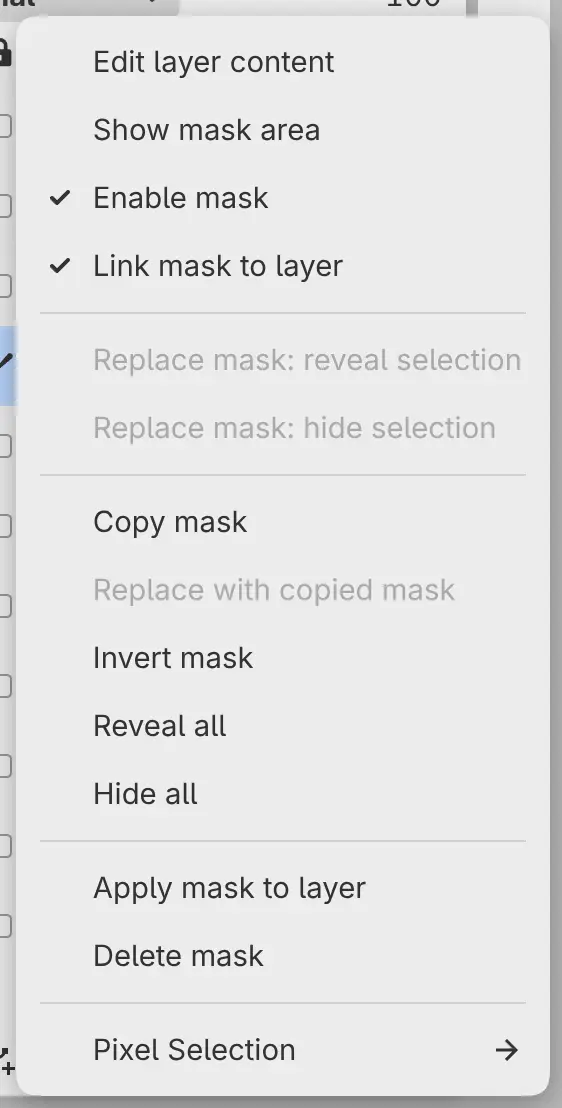
| Item | Does |
|---|---|
| Edit layer content | Returns to painting on the layer. |
| Show mask area | Shows the mask on the canvas and selects it for painting. |
| Enable mask | Turns the mask on or off without changing it. A disabled mask has a faded thumbnail. |
| Link mask to layer | When on, the mask moves with the layer. When off, Move layer / mask moves the layer or the mask, whichever you paint on. The link button between the thumbnails does the same. |
| Replace mask: reveal selection, Replace mask: hide selection | Replaces the mask with the selection. |
| Copy mask | Copies the mask, for Replace with copied mask on another layer, or Paste mask on a layer without a mask. |
| Invert mask | Swaps the shown and hidden areas. |
| Reveal all, Hide all | Makes the mask show or hide the whole layer, and turns off inversion. |
| Apply mask to layer | Erases the pixels the mask hides, then removes the mask. |
| Delete mask | Removes the mask. The layer’s pixels don’t change. |
| Pixel Selection | Loads the mask as a selection. |
Every item except Edit layer content, Show mask area and Copy mask needs an unlocked layer.
Applying a mask
Do one of the following:
- Choose Layer > Mask > Apply mask to layer.
- Select Apply Mask in the mask editing bar.
Apply mask to layer works only on paint layers, and the mask must be enabled. On a distorted or warped layer, choose Apply transform first. To apply the mask of a group, use Merge Group (see Merging layers).
Applying a mask to an Object layer rasterizes it.
Masks on filter and fill layers
The mask of a filter sets where the filter applies. With a filter or fill layer selected, brushes always paint its mask. Fill, Gradient and other tools that draw artwork don’t work on a filter’s mask. Painting on a fill layer needs a mask.